We are closing in
CALL NOW!
A static website doesn’t reflect a dynamic business. Scheduled Content allows you to bridge the gap between your physical operations and your digital presence by automating what your visitors see based on the day and time.
Using If-So’s scheduling logic, you can define “Active” and “Inactive” windows for any part of your site.
For example, you can show a “Call Now” button during office hours and automatically swap it for an “Email Us” form the second you close.
While the Schedule handles the content swap, you can optionally layer in a Timer to show visitors exactly how much time remains in the current window.
This ensures your site feels managed, reliable, and perfectly synced with your team’s availability.
Use Cases
- The “Same-Day Shipping” Cutoff: Display a real-time countdown to your daily dispatch time (e.g., 3:00 PM). “Order in the next 01:45:20 to have your package ship today!”
- Live Support Availability: Show a countdown to when your support team goes offline. “Our experts are available for the next 45 minutes. Chat now for an immediate response.”
- Daily Order Deadlines for Local Services: For bakeries or florists, show a countdown to the cutoff for next-day delivery. Once the time passes, the “Order Now” button automatically updates to “Pre-order for Tuesday.”
- Consultation “Office Hours”: If you offer “Open Office Hours” on Tuesdays and Thursdays, show a countdown to the start of the next session so leads know when to jump on a call.
For Digital Agencies
Position this as “Operational Automation.” Most clients struggle with manual updates or explaining their hours to frustrated customers. Agencies can charge for the “Logic Audit” – analyzing the client’s business hours and building a self-managing site that reflects those hours in real-time. It’s a sophisticated solution that saves the client time while significantly improving their user experience.
The ROI Connection: Operational Intelligence
Automating your site’s schedule reduces friction and builds immediate trust.
- Expectation Management: By showing “Offline” or “Closed” statuses automatically, you prevent customer frustration and “dead-end” clicks.
- Operational Flow: Encouraging actions (like orders or inquiries) within specific windows helps your team manage daily volume more predictably.
- “Set-and-Forget” Reliability: Once your schedule is programmed, your website manages itself 24/7 without requiring manual updates for weekends or holidays.
How It’s Done: Behind the Scenes of the Example Above
Setting up this automated “Closing Soon” alert is a straightforward process that combines time-based logic with a visual countdown.
In this example, we demonstrate a countdown to indicate that our business is closing soon using a simple shortcode from our Countdown Extension. The trigger is displayed every day an hour before the closing time using the Schedule Condition
1. Generating the Countdown
We used a single shortcode to create a recurring daily timer that counts down to 6:00 PM:
[ifsoCountdown end="18:00" format="min-sec" labels="false"]2. Defining the Schedule
To ensure the message only appears when it is actually relevant, we used the Schedule Condition. We set the visibility window from 5:00 PM to 6:00 PM, Monday through Friday.
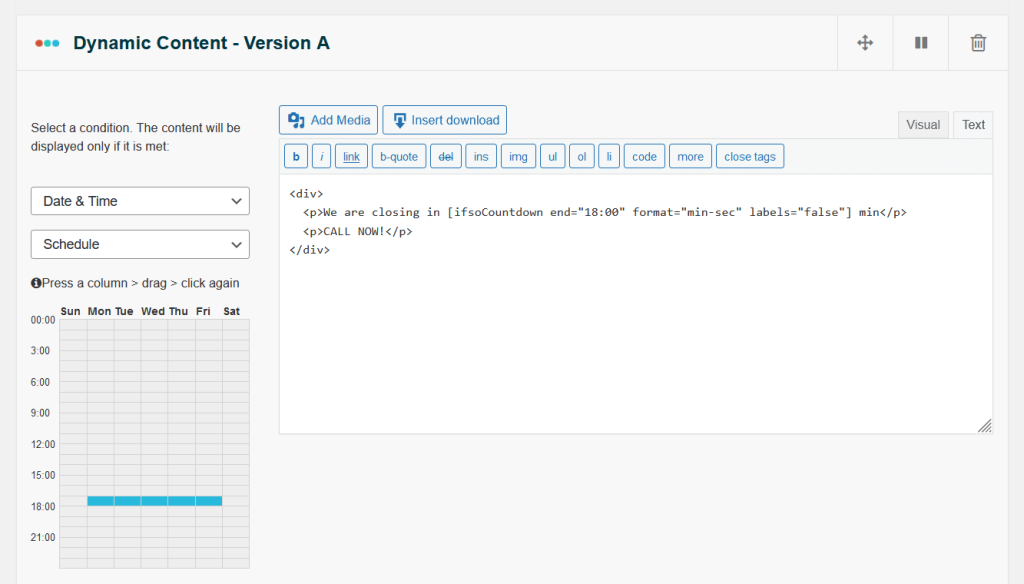
The Result: Your website remains in its standard state all day, automatically switches to “Closing Soon” mode for the final hour of the workday, and stays hidden on weekends—all without any manual updates.